vmware timekeeping part 3
earlier posts here and here.
A review:
1) We removed ntp from the linux guests and left it running on the vmware hosts.
2) We installed open-vm-tools on the guest and live enabled timesync using vmware-guestd
Notes revealed we were gaining about 40s a day.
3) set clock=pit (use clocksource=pit now) in the grub config as a kernel option and restarted a guest
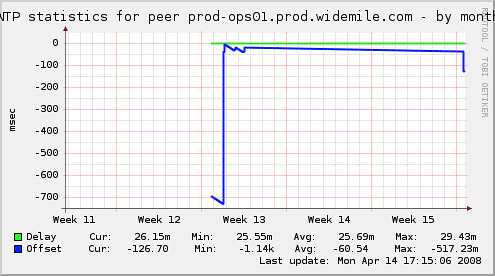
That looks like about 40s over three weeks.
4) today I noticed a lot of "/dev/vmmon[3685]: host clock rate change request 500 -> 998" messages on the vmware hosts (linux) and I set up the recommendations here which is 'host.cpukHz = cpuspeedinkhz', 'host.noTSC = TRUE', and 'ptsc.noTSC = TRUE' to work around possible speed step issues.
I accidentally used khz = mhz * 100 instead of khz = mhz * 1000 which made the time get way off when I stopped and then started the vm I testing was on. This was interesting though because I was afraid I'd have to stop vmware-server, not just an individual vmware-vmx process to get it to re-read /etc/vmware/config.
Looping ntpdate shows about 8/10th of a second gain over 20 minutes. Still more gain than I'd like to see. Will watch the graph and then try again in a week or two.
A review:
1) We removed ntp from the linux guests and left it running on the vmware hosts.
2) We installed open-vm-tools on the guest and live enabled timesync using vmware-guestd
Notes revealed we were gaining about 40s a day.
3) set clock=pit (use clocksource=pit now) in the grub config as a kernel option and restarted a guest
That looks like about 40s over three weeks.
4) today I noticed a lot of "/dev/vmmon[3685]: host clock rate change request 500 -> 998" messages on the vmware hosts (linux) and I set up the recommendations here which is 'host.cpukHz = cpuspeedinkhz', 'host.noTSC = TRUE', and 'ptsc.noTSC = TRUE' to work around possible speed step issues.
I accidentally used khz = mhz * 100 instead of khz = mhz * 1000 which made the time get way off when I stopped and then started the vm I testing was on. This was interesting though because I was afraid I'd have to stop vmware-server, not just an individual vmware-vmx process to get it to re-read /etc/vmware/config.
Looping ntpdate shows about 8/10th of a second gain over 20 minutes. Still more gain than I'd like to see. Will watch the graph and then try again in a week or two.
posted by btm at 5:27 PM


0 Comments:
Post a Comment
<< Home