cisco console cables for synaccess nc08
I inherited a Synaccess NC-08 serial console switch. It's rack mountable, although only front mount. I did take the time a while back to drill new mounts so it would be rear mount.
It came, I suppose, with a number of RJ-45 to DE-9 (DB9) Female adapters (see npman.pdf page 47). This is convenient as I plug this adapter into a serial console connector on a switch, and can use the existing patch cabling to color code and work the connection back to the rack the console switch is in. Unfortunately, Cisco had the same bright idea. I tried connecting their two RJ45-DE9 adapters together with a male-male gender changer but that didn't work. I then tried putting a null modem cable in there as well, but that didn't work either.
Giving up, I emailed synaccess support hoping they'd have an easy answer so I wouldn't have to think about it. They called me back -right- away. I was shocked. I spent a lot of time trying to explain what I was trying to do though. The idea that I'd hook a switch to a serial device seemed to confuse them. I wonder what their normal customers use these for. They're cheap I suppose, but I don't figure they make a good scrambled egg or anything. They had no answer (about the cable, it's possible it makes a scrambled egg still).
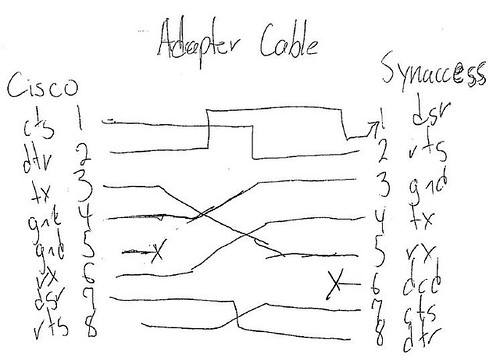
So I stared at the two pinouts for a while and drew up my own cable. Cisco seemed to ignore DCD in their console cable, so I did here hoping it would work. In the past I've seen DCD tied to DSR and I didn't want to have to be splicing wires. I also dropped the second ground on the cisco side, figuring the two would be tied together in the cisco connector and that I didn't have to worry too much about electrical physics in this small little cable. And aha! it works. Now if I could just buy six of these instead of having to make them.
Cisco to Synaccess rj45 adapter cable pinouts (for the search engines)
1 CTS : RTS 2
2 DTR : DSR 1
3 TXD : RXD 5
4 GND : GND 3
5 GND X DCD 6
6 RXD : TXD 4
7 DSR : DTR 8
8 RTS : CTS 7
It came, I suppose, with a number of RJ-45 to DE-9 (DB9) Female adapters (see npman.pdf page 47). This is convenient as I plug this adapter into a serial console connector on a switch, and can use the existing patch cabling to color code and work the connection back to the rack the console switch is in. Unfortunately, Cisco had the same bright idea. I tried connecting their two RJ45-DE9 adapters together with a male-male gender changer but that didn't work. I then tried putting a null modem cable in there as well, but that didn't work either.
Giving up, I emailed synaccess support hoping they'd have an easy answer so I wouldn't have to think about it. They called me back -right- away. I was shocked. I spent a lot of time trying to explain what I was trying to do though. The idea that I'd hook a switch to a serial device seemed to confuse them. I wonder what their normal customers use these for. They're cheap I suppose, but I don't figure they make a good scrambled egg or anything. They had no answer (about the cable, it's possible it makes a scrambled egg still).
So I stared at the two pinouts for a while and drew up my own cable. Cisco seemed to ignore DCD in their console cable, so I did here hoping it would work. In the past I've seen DCD tied to DSR and I didn't want to have to be splicing wires. I also dropped the second ground on the cisco side, figuring the two would be tied together in the cisco connector and that I didn't have to worry too much about electrical physics in this small little cable. And aha! it works. Now if I could just buy six of these instead of having to make them.
Cisco to Synaccess rj45 adapter cable pinouts (for the search engines)
1 CTS : RTS 2
2 DTR : DSR 1
3 TXD : RXD 5
4 GND : GND 3
5 GND X DCD 6
6 RXD : TXD 4
7 DSR : DTR 8
8 RTS : CTS 7
posted by btm at 3:55 PM
0 comments


